
Memory Cards Explained: Types, Specs, and Uses in Electronics
Nov 26, 2025
Introduction
A memory card’s just a tiny chip you pop into your device to hold stuff, photos, videos, whatever. Phones, cameras, and game consoles all use it when built-in storage isn’t enough.
It runs on flash memory, so it’s quick and doesn’t forget things when the power’s off. It doesn’t need moving parts either, which makes it tough. Whether you’re saving vacation pics or logging data in some industrial setup, it does the job without taking up much space.
What Is a Memory Card?

A memory card’s a tiny, removable chip that stores digital stuff, photos, videos, files, whatever. It hangs out in phones, cameras, game consoles, and other gadgets that need extra space.
It uses flash memory, so it keeps your data even when the power’s off. No moving parts either, which makes it tougher than old-school hard drives.
You slide it into a slot, and boom, more storage. Or use it to move files from one device to another.
Inside the card, you’ve got NAND flash cells; they hold data by trapping electric charges in tiny transistors. There’s also a controller chip that keeps things running: it reads, writes, fixes errors, and spreads out wear so the card doesn’t burn out too fast.
Memory cards come in all shapes and sizes. SD, microSD, miniSD, and CompactFlash and Memory Stick each fit different gear and handle different speeds.
They’re rated by how much stuff they can hold and how fast they can move it. Some even pack security features to keep your files safe from prying eyes or accidental deletions.
Key Functions of a Memory Card
-
- Stores digital data using flash memory
-
- Enables portable and removable storage
-
- Expands device capacity without internal upgrades
-
- Facilitates file transfer between systems
-
- Supports high-speed access for multimedia and apps
Memory Card Format Comparison
| Format | Size (mm) | Common Use Case | Max Capacity |
|---|---|---|---|
| SD | 32 × 24 × 2.1 | Cameras, laptops | Up to 2 TB |
| microSD | 15 × 11 × 1 | Smartphones, drones | Up to 1 TB |
| miniSD | 21.5 × 20 × 1.4 | Older mobile devices | Up to 2 GB |
| CompactFlash | 43 × 36 × 3.3 | DSLRs, industrial gear | Up to 512 GB |
| Memory Stick | 50 × 21.5 × 2.8 | Sony devices | Up to 256 GB |
| CFexpress | 38.5 × 29.8 × 3.8 | Professional cameras | Up to 4 TB |
Most memory cards are hot-swappable. You can pop them in or out without shutting down the device; no reboot is needed.
They use standard file systems like FAT32, exFAT, or NTFS. That’s what decides how your data gets stored and accessed.
Some cards support wear leveling, a trick that spreads out write cycles so the card lasts longer.
Error correction is built into the controller chip. It catches small data glitches and fixes them during reads and writes.
Certain formats have a little switch for write protection. Flip it, and you can’t delete or overwrite files by accident.
Durability’s a big deal too. Many cards can take water, shock, and heat without breaking a sweat.
You’ll also find them in embedded systems, GPS units, IoT sensors, and stuff that logs data or needs updates on the fly.
The controller chip inside does a lot of the heavy lifting: managing data flow, buffering, and talking to the host device.
Some cards have speed class markings. Those tell you the minimum write speed, useful for video recording or apps that need fast storage.
Once you get what a memory card is, you’re ready to dig into how it actually stores and retrieves data.
How Do Memory Cards Work?
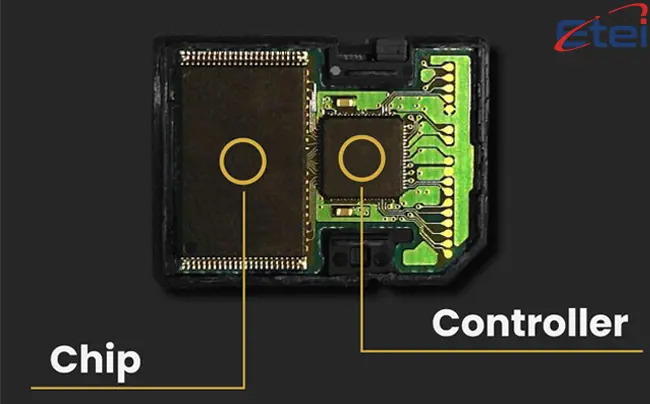
Memory cards use flash memory, the kind that remembers your data even when the power’s gone. Inside, they trap electric charges in tiny transistors called floating-gate cells.
Each cell holds a bit: either a 1 or a 0, depending on the charge. The cells are grouped into pages, and those pages into blocks, which helps keep everything neat and easy to manage.
To write data, the card zaps certain cells with voltage to change their charge. Reading’s simpler; just check the voltage level to see what bit’s stored.
Erasing’s a bit clunky. You can’t clear one cell at a time; it wipes whole blocks. That takes longer and wears the card down over time.
The controller chip is the brain of the operation. It handles where data goes, spreads out wear, fixes small errors, and talks to the device.
Wear leveling spreads the writing across all blocks so no single area wears out too fast.
Error correction catches little glitches and fixes them, so you don’t lose data even if some cells start to degrade.
Buffering helps smooth things out; it is temporary storage that keeps read/write speeds steady.
Bad block mapping is another trick. If a section goes bad, the controller reroutes data to a healthy spot.
Some cards even have power loss protection. If the device shuts down suddenly, your data doesn’t get scrambled.
Key Processes in Memory Card Operation
-
- Data is stored as electrical charges in flash cells
-
- Controller manages read, write, and erase cycles
-
- Wear leveling extends lifespan by balancing usage
-
- Error correction ensures reliable data access
-
- Buffering improves speed and efficiency
Memory Card Operation Breakdown
| Component | Function | Impact on Performance |
|---|---|---|
| Flash Memory Cells | Store binary data using charge | Enables non-volatile storage |
| Controller Chip | Manages all internal operations | Determines speed and reliability |
| Wear Leveling | Balances write cycles | Extends card lifespan |
| Error Correction | Fixes minor data errors | Improves data integrity |
| Buffering | Temporary data storage | Enhances read/write performance |
| Block Erase | Clears large memory sections | Affects write speed and endurance |
| Bad Block Mapping | Avoids damaged areas | Maintains consistent operation |
| Power Protection | Prevents corruption on shutdown | Secures critical data |
Flash memory works by trapping electrons in floating-gate transistors. Those trapped charges? That’s your data, ones and zeros.
The controller chip’s the middleman. It takes commands from your device and turns them into memory actions. Make sure everything plays nice.
Data gets written in pages but erased in blocks. That setup slows things down and wears the card out over time.
Wear leveling helps with that. It spreads out the writes so no single spot gets hammered too hard.
Error correction codes, ECC, are baked into the data stream. They catch and fix tiny bit-level mistakes automatically.
Buffering helps smooth things out. The controller queues up operations to cut down on lag and boost speed.
Bad blocks? They get flagged and skipped. The controller reroutes data to healthy spots so nothing breaks.
Power loss protection kicks in if the device shuts off suddenly. Capacitors or firmware tricks help save your data before it’s gone.
Some cards even throttle speed when they get hot. Keeps them from overheating during heavy use.
High-end cards support parallel access, with multiple memory channels working at once. That means faster reads and writes.
Once you get how all this works, it’s easier to see why some cards perform better than others and what limits them. Next up: the different types of memory cards and what each one’s built for.
Types of Memory Cards

Memory cards come in all kinds of formats, each built for different gear and speed needs. Size, interface, and how much they can hold. All that depends on where they’re used.
SD cards are the go-to. You’ll find them in cameras, laptops, and even some embedded systems.
microSD cards are the tiny version. Perfect for phones, drones, and other small gadgets.
miniSD? That one’s mostly history. It showed up in early phones but didn’t stick around.
CompactFlash (CF) cards are bigger and tougher. Pro cameras and industrial gear still use them.
CFexpress is the new speed demon. Built for 4K, 8K, and anything that needs serious write speed.
Memory Stick was Sony’s thing. You’ll see it in older Sony cameras and devices.
XQD cards are made for fast photography. Some DSLRs and mirrorless cameras still use them.
eMMC and UFS aren’t removable; they’re soldered right onto the board in phones and tablets. Still flash memory, just built-in.
Some formats have extended versions, SDHC, SDXC, and microSDXC, for when you need more space.
Common Memory Card Formats
-
- SD: Standard format for cameras and laptops
-
- microSD: Compact version for mobile devices
-
- CompactFlash: Rugged format for professional gear
-
- CFexpress: High-speed format for advanced video
-
- Memory Stick: Proprietary format for Sony devices
SD cards are divided into classes based on capacity. SDHC supports up to 32 GB, while SDXC goes beyond 2 TB.
microSD cards follow the same classification. They are available in microSDHC and microSDXC variants.
CompactFlash cards use a parallel interface. This allows high data throughput for professional applications.
CFexpress cards use PCIe and NVMe protocols. These deliver ultra-fast read and write speeds.
Memory Stick cards are slower and less common today. They are mostly found in legacy Sony products.
XQD cards are faster than CompactFlash. They are used in cameras that require rapid burst shooting.
eMMC and UFS are not removable. They are embedded directly into the device’s motherboard.
Some cards support advanced features like wear leveling and error correction. These improve reliability and lifespan.
Speed ratings vary by format and manufacturer. Users should match card speed to device requirements.
Understanding the types of memory cards helps in choosing the right one for your device. The next section will cover the technical specifications that define their performance.
Applications in Electronics
Memory cards show up in all kinds of devices, phones, cameras, drones, consoles, you name it. They’re small, hold a ton of data, and work well in both everyday gear and heavy-duty setups.
In phones, they’re a quick way to add more space for photos, videos, and apps, no need to buy a new device.
Cameras use them to store high-res shots and video. Pros go for the fast ones to handle burst mode and 4K footage.
Drones log flight data and record aerial video. That means the card needs to write fast, no lag, no dropped frames.
Gaming consoles use them for saves, downloads, and media. Some even let you install full games on external cards.
IoT devices rely on them to log sensor data and push firmware updates. These cards need to be tough, remote spots, rough conditions.
Dash cams and security cams use loop recording. They keep overwriting old footage so the card doesn’t fill up.
Medical gear stores patient data and diagnostics. These cards need to be secure and super reliable.
Industrial systems use them for config files and event logs. Cards here have to handle vibration, heat, and cold without flinching.
3D printers load print files from memory cards. That way, they can run offline, no computer needed.
Common Uses of Memory Cards in Electronics
-
- Expanding smartphone storage for media and apps
-
- Capturing high-resolution photos and video in cameras
-
- Recording flight data and footage in drones
-
- Saving games and media on gaming consoles
-
- Logging sensor data in IoT and embedded systems
Memory Card Applications by Device
| Device Type | Use Case | Key Requirement |
|---|---|---|
| Smartphone | Media and app storage | High capacity, A1/A2 class |
| Digital Camera | Photo and video capture | Fast write speed, V30+ class |
| Drone | Aerial footage and telemetry | High endurance, UHS-I or higher |
| Gaming Console | Game saves and downloads | Large capacity, fast access |
| IoT Device | Data logging and updates | Durability, low power |
| Dash Cam | Continuous loop recording | High endurance, V10+ class |
| Medical Equipment | Patient data storage | Data integrity, encryption |
| Industrial System | Event logging and configuration | Shock and temperature resistance |
| 3D Printer | Offline print file loading | Compatibility, FAT32/exFAT |
Conclusion
You see memory cards in just about everything: phones, cameras, game consoles, and industrial machines. They’re small, sturdy, and hold a ton of data.
They work for casual stuff and serious jobs. Doesn’t matter if it’s vacation photos or factory logs, they’re built to handle it.
Once you get how they’re built, how they work, and what the specs actually mean, it’s way easier to pick the right one for the job.
And they’re still evolving. As our digital needs grow, memory cards will keep getting faster, bigger, and more resilient.
FAQs
Can I use the same memory card in different devices?
Yes, as long as both devices support the card type and file system, you’re good.
What if I yank the memory card out while it’s working?
Not a great idea. You could corrupt files or mess up the file system.
How do I know what speed class I need for memory cards?
Check your device’s manual, especially if you’re recording video or running apps off the card.
Why does a memory card say "full" even after I deleted stuff?
Files might still be in the recycle bin, or the card might need a full format.
Do memory cards wear out?
Yes. Flash memory has a limited number of write/erase cycles. Wear leveling helps, but nothing lasts forever.
Is formatting a memory card better than just deleting files?
Usually, yes. Formatting clears everything, even hidden junk, and resets the file system.
Which file system should I use for memory cards?
FAT32 works on most things. exFAT handles big files. NTFS is more for Windows-only setups.
Can I get back deleted files from memory cards?
Sometimes. If they haven’t been overwritten, recovery software might bring them back.
Are all microSD memory cards the same?
Not even close. They vary in speed, size, and performance. Match the card to your device’s needs.
How should I store extra memory cards?
Keep them in a case, away from heat, moisture, and static. Treat them like tiny hard drives.
Publicação AnteriorCurrent Transformers Explained: Types, Working Principles, and Electrical Applications
Próxima PublicaçãoWhat Is an Optocoupler? Types, Working Principles, and Applications in Electronics
Semelhante

Flip-flops are digital circuits that sto..

Sensors detect changes in the environmen..

Oscillators are circuits that generate r..

Thermopiles are sensors that convert hea..

CR123 and CR123A batteries are the same ..

The L1154F is an alkaline button cell, s..
QUENTE

Telephone cables (RJ11) connect landline..

AG10 battery equivalents include 189, LR..

Battery testers check battery health by ..

Switch poles control how many circuits a..

Learn how to strip a wire safely and eff..